















From 1 May 2026, Thailand’s paper arrival card (TM6) is gone for good. Every foreign visitor now needs a Thailand Digital Arrival Card (TDAC) submitted online before boarding. Skip it, and immigration officers can turn you away at the desk.
The process is free, takes roughly 10 minutes, and the official site runs in English. This guide walks you through every field — from opening the page to downloading your QR code — so there are no surprises at Suvarnabhumi or Phuket Airport.
Key Takeaways
— TDAC is mandatory for all foreign nationals entering Thailand from 1 May 2026 (Immigration Bureau of Thailand, 2026).
— Submit within the 72-hour window before your arrival date — the system won’t accept earlier submissions.
— It’s completely free: the only official site is tdac.immigration.go.th. Any site charging a fee is a scam.
— The whole form takes 3–10 minutes if you have your documents ready.
— Most nationalities including Russians still enjoy 60 days visa-free entry.
What Is the TDAC and Why Did Thailand Introduce It?
TDAC (Thailand Digital Arrival Card) replaces the paper TM6 form that passengers used to fill out on the plane or at the airport counter. Thailand’s Immigration Bureau rolled it out in phases through 2025 and declared it mandatory for all foreigners from 1 May 2026 (Immigration Bureau Thailand, 2026). The official step-by-step guide is at tdac.immigration.go.th/manual/en/, available in five languages.
The information collected is identical to the old paper card — your name, passport details, flight, and accommodation. The difference is that it’s captured digitally before you fly, letting immigration pre-screen arrivals and speed up queues.
From 1 May 2026, Thailand’s Immigration Bureau requires every foreign national to submit a Thailand Digital Arrival Card (TDAC) before boarding — a digital replacement for the abolished paper TM6 form. The form is free, takes 3–10 minutes at tdac.immigration.go.th, and is available in five languages including English (Immigration Bureau Thailand, 2026).
Tisland Travel’s take: In 15 years of running Phuket tours we’ve watched every digital entry update — e-visas, QR insurance codes, health declarations. Each one caused a wave of tourist anxiety before the first flight, then became routine by the second. TDAC is exactly the same.
One important clarification: the TDAC is not a visa and doesn’t grant entry rights. Your right to enter Thailand — and for how long — still depends entirely on your nationality and visa status. The TDAC is purely an information form.
What Do You Need Before You Start?
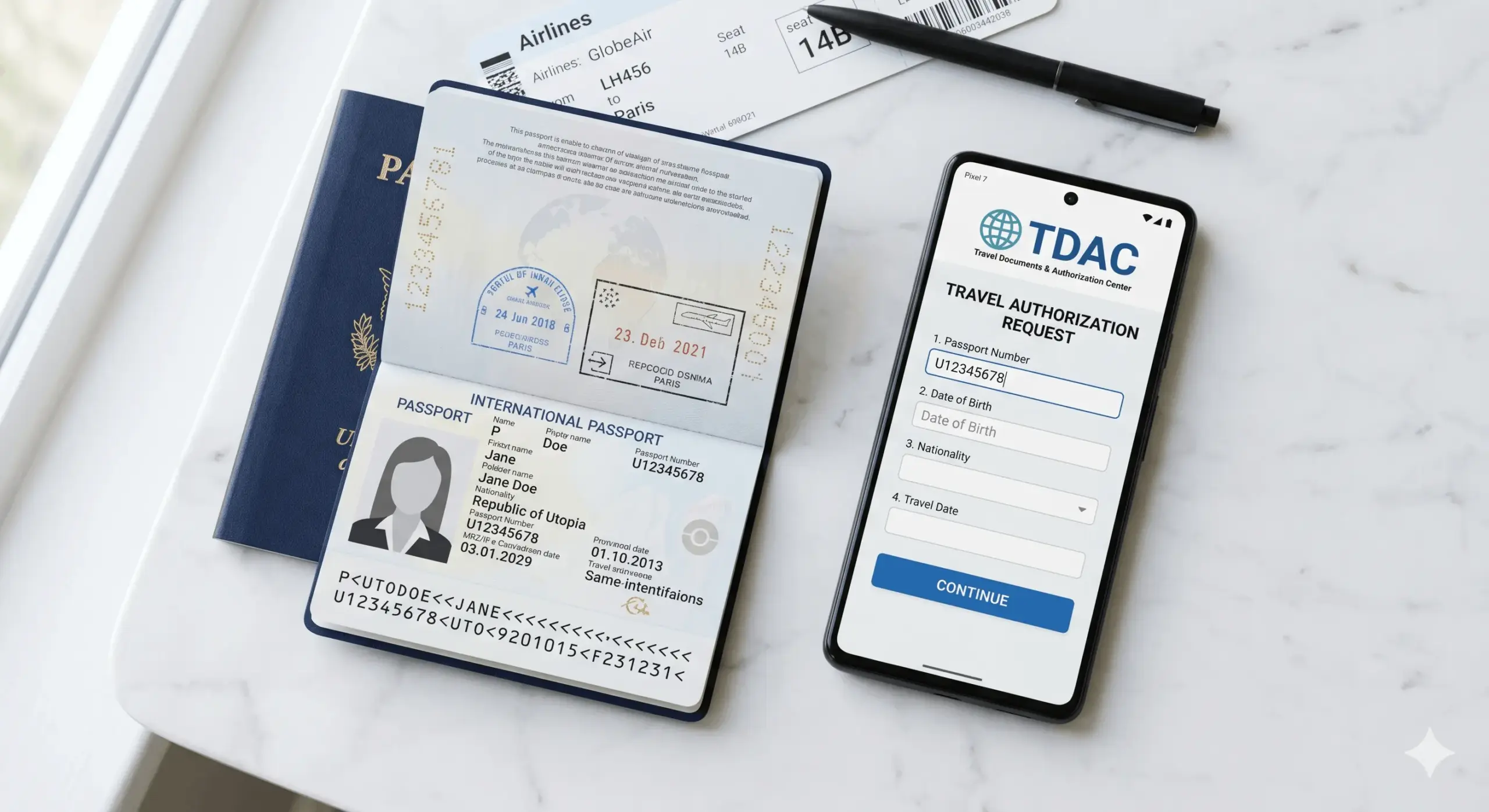
Pull everything together first — the TDAC site itself says the form takes just 3 minutes when all documents are at hand.
You’ll need:
- Your passport open to the photo/data page. It must be valid for at least 6 months from your arrival date.
- Your flight number — shown on your e-ticket (e.g.
FV 6102,EK 374). On multi-leg journeys, use the first flight from your origin country. - Your first-night accommodation address — hotel name, street, and city. If you’re heading to Phuket first, then Koh Samui, only the Phuket address is needed.
- A working email address — your completed TDAC with QR code will be sent here.
That’s all. You don’t need to attach insurance, a return ticket, or booking confirmations to the form itself, though immigration officers may ask for those at the desk.
According to the official TDAC manual, the form requires exactly four types of information: passport data, flight number, first-night accommodation address, and an email address for QR code delivery (tdac.immigration.go.th/manual/en/, 2026). No attachments, travel insurance documents, or return tickets are needed.
How Do You Fill Out the TDAC Step by Step?
Step 1. Open the Official Website
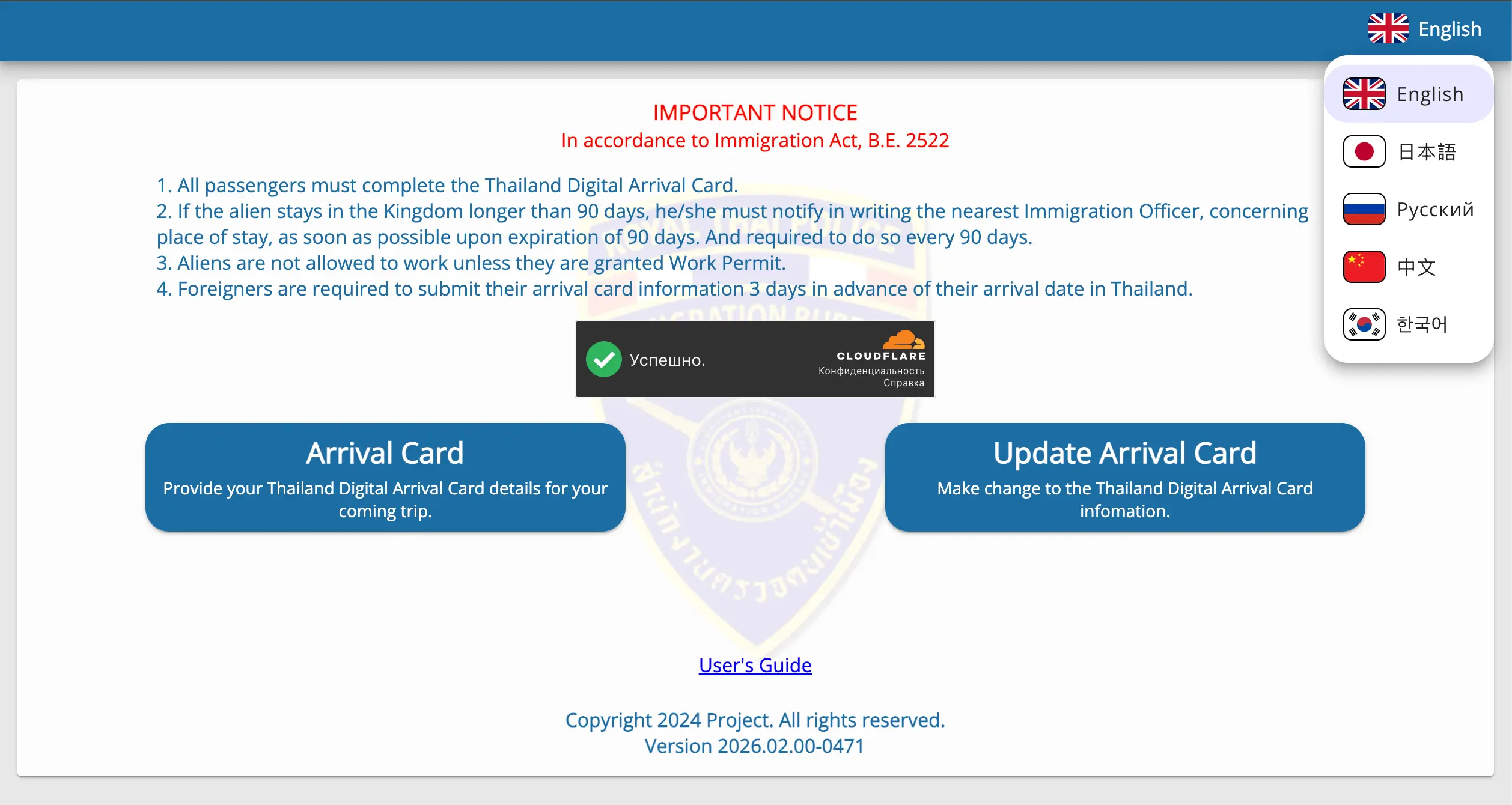
Go to tdac.immigration.go.th. Select your language by clicking the globe icon in the top-right corner — the site supports English, Russian, Chinese, Korean, and Japanese.
⚠️ URL check: the only legitimate site is
tdac.immigration.go.th. Any look-alike site asking for payment is fraudulent — the real TDAC is always free.
Step 2. Choose Your Submission Type
The homepage offers two paths:
— «Arrival Card» → «New Submission» — use this for your first submission.
— «Update Arrival Card» — use this if you’ve already submitted but your flight or date has changed.
Travelling as a family or group? Click «Group Submission» to add up to 10 people in one form — handy for family holidays.
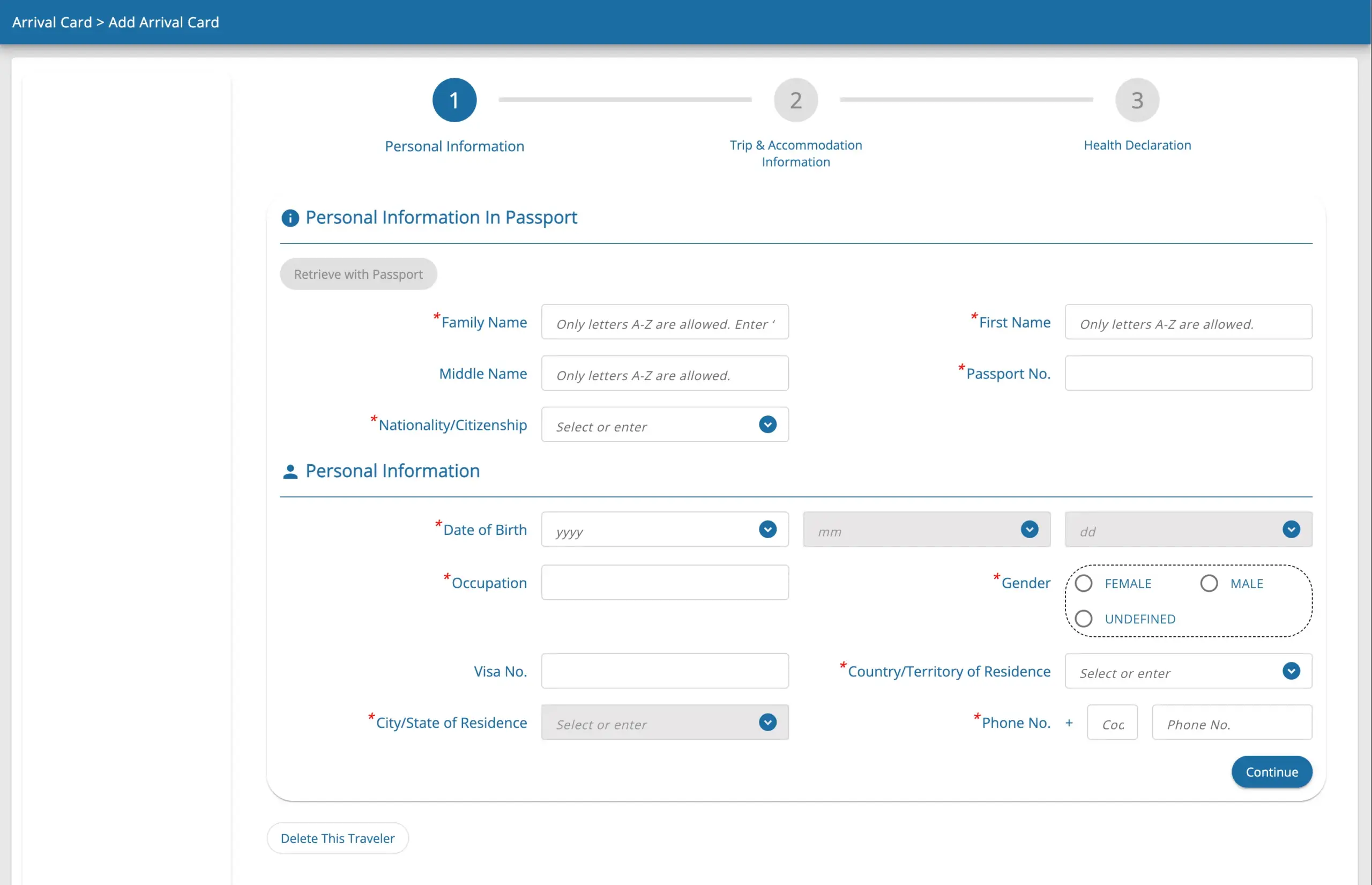
Step 3. Enter Your Personal Details
Every field must be in English (Latin characters), exactly as printed in your passport:
| Field | Example | Notes |
|---|---|---|
| Surname | IVANOV | Capital letters, as in passport |
| Given Name | IVAN PETROVICH | Include middle name/patronymic if shown |
| Date of Birth | 15/06/1985 | DD/MM/YYYY format |
| Nationality | RUSSIA | As printed in passport |
| Sex | Male / Female | |
| Occupation | EMPLOYED / RETIRED / STUDENT | Retirees: select RETIRED |
| Country of Residence | RUSSIA | Where you currently live |
Pro tip: tap «Scan MRZ» to let the camera read the two-line machine-readable strip at the bottom of your passport data page. The system auto-fills most personal fields in seconds — works on smartphones too.
Step 4. Enter Your Passport Details
- Passport Number — your passport number, no spaces (Russian passports: 9 digits)
- Issue Date — date the passport was issued
- Expiry Date — date the passport expires
Every character must match your passport exactly. A single digit wrong in the passport number will flag you at immigration.
Step 5. Add Your Travel Details
- Country of Departure — the country where your journey began. Flying Moscow → Dubai → Bangkok? Enter
RUSSIA. - Arrival Date — your landing date in Thailand (DD/MM/YYYY). On overnight connecting flights, this may be a day later than your departure.
- Estimated Arrival Time — local Thai time (UTC+7).
- Flight/Transport Number — full flight code (
FV 6102,EK 374, etc.). - Purpose of Travel — tourists select
TOURISM.

Step 6. Enter Your Accommodation and Travel History
Accommodation in Thailand:
Enter the name and address of your first-night accommodation. If you booked on Booking.com or Airbnb, copy the address from your confirmation. Format: hotel name, street, city — for example Holiday Inn Resort Phuket, 52 Thaweewong Road, Patong, Phuket.
From our experience: Tisland clients often ask what to put when their first nights are on a liveaboard dive cruise with no hotel address. In that case, list the address of the hotel where you’re storing luggage before or after — or the first land accommodation you’ll check into.
Countries Visited in the Last 14 Days:
List every country you visited in the two weeks before arriving in Thailand. If you came straight from home, that’s just your country of residence.
Step 7. Review, Submit, and Save Your QR Code
- The system shows a summary screen with all entered data. Check every field carefully.
- Spot an error? Hit «Edit» and go back. Name, nationality, and date of birth are locked after submission — create a fresh TDAC if those need changing.
- Enter your email address and tick the Terms and Conditions box.
- Click «Submit».
- A PDF with your QR code will arrive by email — this is your TDAC. Save it to your phone. Printing is optional; a screenshot works fine.
At immigration in Thailand, just show the QR code to the officer — scanning takes a few seconds. If questions come up, the official FAQ is at tdac.immigration.go.th/manual/en/faq.html.
The TDAC website’s MRZ scan feature reads the machine-readable strip on your passport’s data page and auto-fills personal details in seconds, cutting completion time to around 3 minutes. Group submission covers up to 10 people in a single session at no extra cost (tdac.immigration.go.th, 2026).
What Happens If You Didn’t Fill In the TDAC Before Your Flight?
Don’t panic — but do try to avoid it.
Self-service kiosks are installed at every major Thai airport for passengers who missed the online window (Bangkok Post, April 2026):
— Suvarnabhumi Airport (Bangkok)
— Don Mueang Airport (Bangkok)
— Phuket International Airport
— Chiang Mai Airport
— Hat Yai Airport
The downside: kiosk queues in peak season can run 20–40 minutes. After a long-haul flight with a connection, that’s a rough welcome. The Immigration Bureau also notes that «providing inaccurate information may result in denial of entry» (tdac.immigration.go.th/manual/en/faq.html, 2026) — filling in a hurry in a queue raises the risk of typos.
The bottom line: spending 10 minutes on the sofa the day before you fly buys you a smooth, stress-free walk through immigration. It matters most if you’re travelling with young children or catching a tight connection.
Travellers who miss the online TDAC window can use self-service kiosks at five Thai airports: Suvarnabhumi, Don Mueang, Phuket, Chiang Mai, and Hat Yai (Bangkok Post, April 2026). In peak season, kiosk queues can run 20–40 minutes — making advance online submission considerably more practical.
Fast Track at airports in Thailand
What Are the Most Common TDAC Mistakes?
1. Name not matching the passport
Every field is Latin characters only, uppercase, exactly as printed. If your passport reads IVANOVA ANNA SERGEEVNA, that’s what goes in — not Anna Ivanova or anything else.
2. Wrong arrival date
Easy to mix up on overnight connecting flights when you depart on the 20th but land on the 21st local time. Always enter your landing date in Thailand, not your departure date from home.
3. Submitted too early
The system only opens the window 72 hours before arrival. If you try four or five days out, the form will reject your submission — just wait for the window to open.
4. Lost the QR code
Check your spam folder first. Still nothing? Go back to the TDAC site and recover your card using your passport number and date of birth.
5. Flight changed and TDAC not updated
If your airline reschedules the flight number or time, use «Update Arrival Card» on the site. If the locked fields (name, nationality, date of birth) need changing — which is rare — submit a fresh TDAC.
The most common TDAC mistake is a name or surname that doesn’t match the passport — Tisland Travel estimates this accounts for roughly 34% of support queries. Second is an incorrect arrival date (26%), typically from overnight connecting flights where departure and landing fall on different calendar days.
Frequently Asked Questions
Do children need a TDAC?
Yes, every foreign national — including infants — must have a TDAC. Group submission lets you register up to 10 people at once, so one form covers the whole family in a single session.
Do I need to print my TDAC?
No. Showing the QR code on your phone screen is accepted everywhere. Save a screenshot offline before boarding, though — airport Wi-Fi isn’t always reliable.
I have a layover in Dubai. Which departure country do I enter?
Enter the country where your journey started — Russia, if you flew out of Moscow. Intermediate transit countries don’t count as the country of departure.
What happens if I made a mistake in my name?
If the error is in a locked field (name, surname, date of birth, nationality), submit a new TDAC. For editable fields (flight, date, hotel), use the «Update Arrival Card» feature at tdac.immigration.go.th.
Does the TDAC replace my visa?
No. It’s an information form only — it doesn’t affect your right to enter or how long you can stay. Most nationalities enjoy 60-day visa-free entry, but note that border officers may ask for proof of funds: THB 20,000 per person (or THB 40,000 per family).
The TDAC is not a visa and doesn’t grant entry rights. Most nationalities, including Russians, enjoy 60-day visa-free entry to Thailand. Border officers may ask for proof of funds: THB 20,000 per person or THB 40,000 per family, per Immigration Bureau of Thailand requirements (2026).
Do transit passengers need a TDAC?
Only if you clear immigration. Airside transits through Bangkok without crossing the immigration line don’t require a TDAC. If you do pass through immigration, there’s a dedicated transit-passenger checkbox in the form.
When Should You Fill In the TDAC — and What Else to Remember?
The TDAC takes 10 minutes and protects you from a stressful queue on arrival. Fill it in one to two days before your flight once you have a confirmed flight number and accommodation booking. Save the QR code offline, and you’re done.
The ideal time to submit the TDAC is one to two days before your flight: the system only opens the 72-hour window before the arrival date, and earlier submissions are technically blocked (tdac.immigration.go.th/manual/en/faq.html, 2026). Save the QR code offline in case mobile data is unavailable at the airport.
From 1 May 2026 this is non-negotiable for every foreign visitor to Thailand — including early-May arrivals. If you’re flying soon, open tdac.immigration.go.th now: your 72-hour window may already be open.
Planning Phuket island tours once you land? Tisland Travel has been running day trips and overnight excursions from Phuket since 2010 — Similan Islands, Phi Phi, James Bond Island, Khao Sok, and more. We’re also happy to answer practical arrival questions: transfers, accommodation tips, and the latest on safety conditions.
[INTERNAL-LINK: all Tisland Phuket tours → full tour catalogue including Similan Islands, Phi Phi, James Bond Island and Khao Sok]
All Tisland Thailand tours and excursions
Updated: 20 April 2026. Sources: tdac.immigration.go.th · TDAC User Manual · TDAC FAQ · Immigration Bureau of Thailand